Software surplus lockfolder home made:
· free, free to be used, distributed even modified
· has portabel, so that unnecessary at install
· the file size very little, only 53 kb
Manner makes lockfolder:
· open editor text, for example notepad (click start -> programs -> acessories -> notepad)
· copy-paste programming code next into notepad
Then save (ctrl+s) by the name of lockfolder. bat (not lockfolder. txt).
Look at programming codes, in part "if note %pass%==isparmo. web. id goto fail"
Change isparmo. web. id with password whom we want (can font, number, or font combination and number). then save again.
Then, try to run file lockfolder. bat (double click)s. moment be run first time be created a new folder will named locker.
· free, free to be used, distributed even modified
· has portabel, so that unnecessary at install
· the file size very little, only 53 kb
Manner makes lockfolder:
· open editor text, for example notepad (click start -> programs -> acessories -> notepad)
· copy-paste programming code next into notepad
cls
@ECHO OFF
title Folder Locker
if EXIST "Control Panel.{21EC2020-3AEA-1069-A2DD-08002B30309D}" goto UNLOCK
if NOT EXIST Locker goto MDLOCKER
:CONFIRM
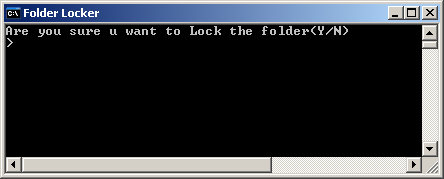
echo Are you sure u want to Lock the folder(Y/N)
set/p "cho=>"
if %cho%==Y goto LOCK
if %cho%==y goto LOCK
if %cho%==n goto END
if %cho%==N goto END
echo Invalid choice.
goto CONFIRM
:LOCK
ren Locker "Control Panel.{21EC2020-3AEA-1069-A2DD-08002B30309D}"
attrib +h +s "Control Panel.{21EC2020-3AEA-1069-A2DD-08002B30309D}"
echo Folder locked
goto End
:UNLOCK
echo Enter password to Unlock folder
set/p "pass=>"
if NOT %pass%==isparmo.web.id goto FAIL
attrib -h -s "Control Panel.{21EC2020-3AEA-1069-A2DD-08002B30309D}"
ren "Control Panel.{21EC2020-3AEA-1069-A2DD-08002B30309D}" Locker
echo Folder Unlocked successfully
goto End
:FAIL
echo Invalid password
goto end
:MDLOCKER
md Locker
echo Locker created successfully
goto End
:End
@ECHO OFF
title Folder Locker
if EXIST "Control Panel.{21EC2020-3AEA-1069-A2DD-08002B30309D}" goto UNLOCK
if NOT EXIST Locker goto MDLOCKER
:CONFIRM
echo Are you sure u want to Lock the folder(Y/N)
set/p "cho=>"
if %cho%==Y goto LOCK
if %cho%==y goto LOCK
if %cho%==n goto END
if %cho%==N goto END
echo Invalid choice.
goto CONFIRM
:LOCK
ren Locker "Control Panel.{21EC2020-3AEA-1069-A2DD-08002B30309D}"
attrib +h +s "Control Panel.{21EC2020-3AEA-1069-A2DD-08002B30309D}"
echo Folder locked
goto End
:UNLOCK
echo Enter password to Unlock folder
set/p "pass=>"
if NOT %pass%==isparmo.web.id goto FAIL
attrib -h -s "Control Panel.{21EC2020-3AEA-1069-A2DD-08002B30309D}"
ren "Control Panel.{21EC2020-3AEA-1069-A2DD-08002B30309D}" Locker
echo Folder Unlocked successfully
goto End
:FAIL
echo Invalid password
goto end
:MDLOCKER
md Locker
echo Locker created successfully
goto End
:End
Then save (ctrl+s) by the name of lockfolder. bat (not lockfolder. txt).
Look at programming codes, in part "if note %pass%==isparmo. web. id goto fail"
Change isparmo. web. id with password whom we want (can font, number, or font combination and number). then save again.
Then, try to run file lockfolder. bat (double click)s. moment be run first time be created a new folder will named locker.


0 komentar:
Post a Comment