Why busy pay nsp to operator if free we get? listen to open that phoned but that phone. . eat it this there is a way of to get service nsp free but pay that phone
its way how? easy broer! ! ! ! ! follow step step next! ! !
1. download" smart answer"
2. install at smartphone you (symbian)
3. after installed, open application. register with keygen that enclosed in this package.
4. click option - setting - spesify response - response - option- sett response: there found song choice that can
be made nsp. choose one of [the].
5. click option - setting - spesify response - response - option- enable/menyable: choose enable all.
6. click option - setting - pick up after: contents with 00.007. max duration contents with how long song
besung.
8. autostart: contents with yes.
9. after admission filling process finished: done and turn on. don't out from application but choose hide.
10. nsp ready mendengarka by penelpon you.
manner laids song to nsp free:
by using fileman, seleq, or the other. song saves at:
e: nokia/sounds/digital/sa_responses
or
c: nokia/sounds/digital/sa_responses
attention! ! ! song that can be used to nsp free this only berformat" wav" or " amr"
Wednesday, December 16, 2009
MANNER MAKES NSP FREE
Diposkan oleh Firm@n di 9:49 PM 0 komentar
Tuesday, July 21, 2009
Free Proxxy for Your Browser
Free HTTP proxies list:
124.128.62.162:1080
123.237.142.207:6588
201.18.52.154:6588
129.186.205.71:3124
88.249.32.247:8088
210.226.27.92:8080
88.247.226.120:8088
41.234.206.43:8080
118.175.2.75:8080
82.193.122.137:3128
Diposkan oleh Firm@n di 6:54 PM 0 komentar
Wednesday, July 1, 2009
Trik Downloaded Fast Super
Sometimes may be you are confused with speed downloads you very slow. oftentimes you are made peevish. may be this tutorial can a little help you:
First:
Download 3 tool hereunder:First:
Then:
- install beforehand internet downloads manager pack 5.17
- after idm isntal, then click 2x tool u94.
- click 2x tcpz click to patch, nai be 2000. and apply click tcp.
- click icon idm at start=>all programs,click option => connect => change connection type be lan 10mb => defaul max number change to be 16, then ok.
nb: before install all toll don't browsing formerly, so that the result max.
or restart firefox, internet explor, or your opera.
Diposkan oleh Firm@n di 11:42 AM 0 komentar
Monday, June 29, 2009
Make Self Folder Password Software (Lock Folder)
Software surplus lockfolder home made:
· free, free to be used, distributed even modified
· has portabel, so that unnecessary at install
· the file size very little, only 53 kb
Manner makes lockfolder:
· open editor text, for example notepad (click start -> programs -> acessories -> notepad)
· copy-paste programming code next into notepad
Then save (ctrl+s) by the name of lockfolder. bat (not lockfolder. txt).
Look at programming codes, in part "if note %pass%==isparmo. web. id goto fail"
Change isparmo. web. id with password whom we want (can font, number, or font combination and number). then save again.
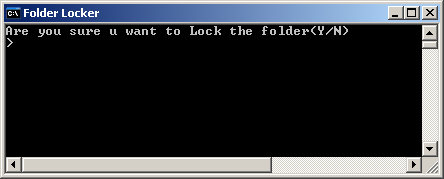
Then, try to run file lockfolder. bat (double click)s. moment be run first time be created a new folder will named locker.
· free, free to be used, distributed even modified
· has portabel, so that unnecessary at install
· the file size very little, only 53 kb
Manner makes lockfolder:
· open editor text, for example notepad (click start -> programs -> acessories -> notepad)
· copy-paste programming code next into notepad
cls
@ECHO OFF
title Folder Locker
if EXIST "Control Panel.{21EC2020-3AEA-1069-A2DD-08002B30309D}" goto UNLOCK
if NOT EXIST Locker goto MDLOCKER
:CONFIRM
echo Are you sure u want to Lock the folder(Y/N)
set/p "cho=>"
if %cho%==Y goto LOCK
if %cho%==y goto LOCK
if %cho%==n goto END
if %cho%==N goto END
echo Invalid choice.
goto CONFIRM
:LOCK
ren Locker "Control Panel.{21EC2020-3AEA-1069-A2DD-08002B30309D}"
attrib +h +s "Control Panel.{21EC2020-3AEA-1069-A2DD-08002B30309D}"
echo Folder locked
goto End
:UNLOCK
echo Enter password to Unlock folder
set/p "pass=>"
if NOT %pass%==isparmo.web.id goto FAIL
attrib -h -s "Control Panel.{21EC2020-3AEA-1069-A2DD-08002B30309D}"
ren "Control Panel.{21EC2020-3AEA-1069-A2DD-08002B30309D}" Locker
echo Folder Unlocked successfully
goto End
:FAIL
echo Invalid password
goto end
:MDLOCKER
md Locker
echo Locker created successfully
goto End
:End
@ECHO OFF
title Folder Locker
if EXIST "Control Panel.{21EC2020-3AEA-1069-A2DD-08002B30309D}" goto UNLOCK
if NOT EXIST Locker goto MDLOCKER
:CONFIRM
echo Are you sure u want to Lock the folder(Y/N)
set/p "cho=>"
if %cho%==Y goto LOCK
if %cho%==y goto LOCK
if %cho%==n goto END
if %cho%==N goto END
echo Invalid choice.
goto CONFIRM
:LOCK
ren Locker "Control Panel.{21EC2020-3AEA-1069-A2DD-08002B30309D}"
attrib +h +s "Control Panel.{21EC2020-3AEA-1069-A2DD-08002B30309D}"
echo Folder locked
goto End
:UNLOCK
echo Enter password to Unlock folder
set/p "pass=>"
if NOT %pass%==isparmo.web.id goto FAIL
attrib -h -s "Control Panel.{21EC2020-3AEA-1069-A2DD-08002B30309D}"
ren "Control Panel.{21EC2020-3AEA-1069-A2DD-08002B30309D}" Locker
echo Folder Unlocked successfully
goto End
:FAIL
echo Invalid password
goto end
:MDLOCKER
md Locker
echo Locker created successfully
goto End
:End
Then save (ctrl+s) by the name of lockfolder. bat (not lockfolder. txt).
Look at programming codes, in part "if note %pass%==isparmo. web. id goto fail"
Change isparmo. web. id with password whom we want (can font, number, or font combination and number). then save again.
Then, try to run file lockfolder. bat (double click)s. moment be run first time be created a new folder will named locker.
Diposkan oleh Firm@n di 6:42 AM 0 komentar
Erase Manner Blue Screen in Windows XP
Blue screen a white sail with text that appears when you booting computer with windows xp. if you don't know manner to break this problem is result final that you will formatting harddisk you and may be can wipe off data2 you.
But to wipe off or repair this problem, you necessary boot from windows xp and then choose repair console (press r), so choose with partion windows xp you want to repair with type integer (1,2. . ) followed to insert key by administrator and put into password if menanya and press enter.
Afterwards will appear as follows:
c: \ windows> and cursor blinks then type chkdsk / r, then press enter to repair and wipe off boot block. after computer finished investigate and will repair error will return you will see:
c: \ windows> with cursor blinks in front of then type exit (lower case letter that suggest)ed. computer restart and boot good fluent without failure.
Good Success. . : )
nb:
1. boot from windows xp original cd boot from cd windows xp original
2. log-in to partion with windows xp to repair
3. type command that given (on)
But to wipe off or repair this problem, you necessary boot from windows xp and then choose repair console (press r), so choose with partion windows xp you want to repair with type integer (1,2. . ) followed to insert key by administrator and put into password if menanya and press enter.
Afterwards will appear as follows:
c: \ windows> and cursor blinks then type chkdsk / r, then press enter to repair and wipe off boot block. after computer finished investigate and will repair error will return you will see:
c: \ windows> with cursor blinks in front of then type exit (lower case letter that suggest)ed. computer restart and boot good fluent without failure.
Good Success. . : )
nb:
1. boot from windows xp original cd boot from cd windows xp original
2. log-in to partion with windows xp to repair
3. type command that given (on)
Diposkan oleh Firm@n di 3:16 AM 0 komentar
Subscribe to:
Posts (Atom)